2025 Developer ToolsEssentialsSpatial ComputingSwiftUI & UI Frameworks
WWDC25 · 26 min · Developer Tools / Essentials / Spatial Computing / SwiftUI & UI Frameworks
What’s new in SwiftUI
Learn what’s new in SwiftUI to build great apps for any Apple platform. We’ll explore how to give your app a brand new look and feel with Liquid Glass. Discover how to boost performance with framework enhancements and new instruments, and integrate advanced capabilities like web content and rich text editing. We’ll also show you how SwiftUI is expanding to more places, including laying out views in three dimensions.
Watch at developer.apple.com ↗Chapters
Code shown on screen · 19 snippets
Toolbar spacer
import SwiftUI

struct TripDetailView: View {
    var body: some View {
        NavigationStack {
            TripList()
                .toolbar {
                    ToolbarItemGroup(placement: .primaryAction) {
                        UpButton()
                        DownButton()
                    }

                    ToolbarSpacer(.fixed, placement: .primaryAction)

                    ToolbarItem(placement: .primaryAction) {
                        SettingsButton()
                    }
                }
        }
    }
}

struct TripList: View {
    var body: some View {
        Text("TripList")
    }
}

struct UpButton: View {
    var body: some View {
        Button("Up", systemImage: "chevron.up") { }
    }
}

struct DownButton: View {
    var body: some View {
        Button("Down", systemImage: "chevron.down") { }
    }
}

struct SettingsButton: View {
    var body: some View {
        Button("List Settings", systemImage: "ellipsis") { }
    }
}
Toolbar item tint
import SwiftUI

struct InspectorView: View {
    var body: some View {
        NavigationStack {
            InspectorMap()
                .toolbar {
                    ToolbarItem(placement: .primaryAction) {
                        SaveLocationButton()
                            .buttonStyle(.borderedProminent)
                            .tint(.pink)
                    }
                }
        }
    }
}

struct InspectorMap: View {
    var body: some View {
        Text("InspectorMap")
    }
}

struct SaveLocationButton: View {
    var body: some View {
        Button("SaveLocationButton") { }
    }
}
Searchable
import SwiftUI
struct PlannerSplitView: View {
private var query: String = ""
var body: some View {
NavigationSplitView {
Text("Sidebar")
} detail: {
Text("Detail")
}
.searchable(
text: $query,
prompt: "What are you looking for?"
)
}
}Search tab
import SwiftUI
struct HealthTabView: View {
private var text: String = ""
var body: some View {
TabView {
Tab("Summary", systemImage: "heart") {
NavigationStack {
Text("Summary")
}
}
Tab("Sharing", systemImage: "person.2") {
NavigationStack {
Text("Sharing")
}
}
Tab(role: .search) {
NavigationStack {
Text("Search")
}
}
}
.searchable(text: $text)
}
}Glass effect
import SwiftUI

struct ToTopButton: View {
    var body: some View {
        Button("To Top", systemImage: "chevron.up") {
            scrollToTop()
        }
        .padding()
        .glassEffect()
    }

    func scrollToTop() {
        // Scroll to top of view
    }
}
Menu bar commands
import SwiftUI

@main
struct TravelPhotographyApp: App {
    var body: some Scene {
        WindowGroup {
            RootView()
        }
        .commands {
            TextEditingCommands()
        }
    }
}

struct RootView: View {
    var body: some View {
        Text("RootView")
    }
}
Window resize anchor
import SwiftUI
struct SettingsTabView: View {
private var selection: SectionTab = .general
var body: some View {
TabView(selection: $selection.animation()) {
Tab("General", systemImage: "gear", value: .general) {
Text("General")
}
Tab("Sections", systemImage: "list.bullet", value: .sections) {
Text("Sections")
}
}
.windowResizeAnchor(.top)
}
}
enum SectionTab: Hashable {
case general
case sections
}@Animatable macro
import SwiftUI
struct LoadingArc: Shape {
var center: CGPoint
var radius: CGFloat
var startAngle: Angle
var endAngle: Angle
var drawPathClockwise: Bool
func path(in rect: CGRect) -> Path {
// Creates a `Path` arc using properties
return Path()
}
}Spatial overlay
import RealityKit
import SwiftUI
struct Map: View {
var timeAlignment: Alignment3D
var body: some View {
Model3D(named: "Map")
.spatialOverlay(
alignment: timeAlignment
) {
Sun()
}
}
}
struct Sun: View {
var body: some View {
Model3D(named: "Sun")
}
}Manipulable and surface snapping
import ARKit
import RealityKit
import SwiftUI
struct BackpackWaterBottle: View {
(\.surfaceSnappingInfo) var snappingInfo: SurfaceSnappingInfo
var body: some View {
VStackLayout().depthAlignment(.center) {
waterBottleView
.manipulable()
Pedestal()
.opacity(
snappingInfo.classification == .table ? 1.0 : 0.0)
}
}
var waterBottleView: some View {
Model3D(named: "waterBottle")
}
}
struct WaterBottleView: View {
var body: some View {
Model3D(named: "waterBottle")
}
}
struct Pedestal: View {
var body: some View {
Model3D(named: "pedestal")
}
}SwiftUI scenes
import SwiftUI

@main
struct PhotoWalk: App {
    var body: some Scene {
        WindowGroup(id: "AppContents") {
            PhotoWalkContent()
        }
    }
}

struct PhotoWalkContent: View {
    var body: some View {
        Text("PhotoWalkContent")
    }
}
Assistive Access scene
import SwiftUI

@main
struct PhotoWalk: App {
  var body: some Scene {
    WindowGroup {
      ContentView()
    }

    AssistiveAccess {
      AssistiveAccessContentView()
    }
  }
}

struct ContentView: View {
  var body: some View {
    Text("ContentView")
  }
}

struct AssistiveAccessContentView: View {
  var body: some View {
    Text("AssistiveAccessContentView")
  }
}
SwiftUI presentations from RealityKit
import RealityKit
import SwiftUI
struct PopoverComponentView: View {
private var popoverPresented: Bool = false
var body: some View {
RealityView { c in
let mapEntity = Entity()
let popover = Entity()
mapEntity.addChild(popover)
popover.components[PresentationComponent.self] = PresentationComponent(
isPresented: $popoverPresented,
configuration: .popover(arrowEdge: .bottom),
content: DetailsView()
)
}
}
}
struct DetailsView: View {
var body: some View {
Text("DetailsView")
}
}Level of detail
import SwiftUI
import WidgetKit
struct PhotoCountdownView: View {
(\.levelOfDetail) var levelOfDetail: LevelOfDetail
var body: some View {
switch levelOfDetail {
case .default:
RecentPhotosView()
case .simplified:
CountdownView()
default:
Text("Unknown level of detail")
}
}
}
struct RecentPhotosView: View {
var body: some View {
Text("RecentPhotosView")
}
}
struct CountdownView: View {
var body: some View {
Text("CountdownView")
}
}WebView
import SwiftUI
import WebKit

struct HikeGuideWebView: View {
    var body: some View {
        WebView(url: sunshineMountainURL)
    }

    var sunshineMountainURL: URL {
        URL(string: "sunshineMountainURL")!
    }
}
WebView with WebPage
import SwiftUI
import WebKit
struct InAppBrowser: View {
private var page = WebPage()
var body: some View {
WebView(page)
.ignoresSafeArea()
.onAppear {
page.load(URLRequest(url: sunshineMountainURL))
}
}
var sunshineMountainURL: URL {
URL(string: "sunshineMountainURL")!
}
}3D charts
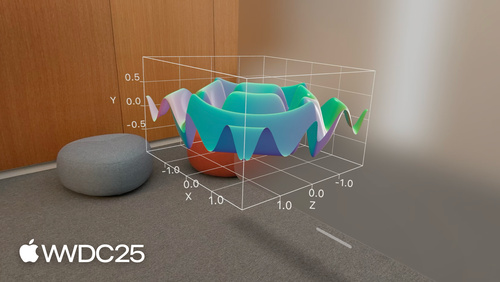
import Charts
import SwiftUI

struct HikePlotView: View {
    var body: some View {
        Chart3D {
            SurfacePlot(
                x: "x", y: "y", z: "z") { x, y in
                    sin(x) * cos(y)
                }
                .foregroundStyle(Gradient(colors: [.orange, .pink]))
        }
        .chartXScale(domain: -3 ... 3)
        .chartYScale(domain: -3 ... 3)
        .chartZScale(domain: -3 ... 3)
    }
}
macOS drag and drop
import SwiftUI
struct DragDropExample: View {
private var selectedPhotos: [Photo.ID] = []
var body: some View {
ScrollView {
LazyVGrid(columns: gridColumns) {
ForEach(model.photos) { photo in
view(photo: photo)
.draggable(containerItemID: photo.id)
}
}
}
.dragContainer(for: Photo.self, selection: selectedPhotos) { draggedIDs in
photos(ids: draggedIDs)
}
.dragConfiguration(DragConfiguration(allowMove: false, allowDelete: true))
.onDragSessionUpdated { session in
let ids = session.draggedItemIDs(for: Photo.ID.self)
if session.phase == .ended(.delete) {
trash(ids)
deletePhotos(ids)
}
}
.dragPreviewsFormation(.stack)
}
}Rich text view
import SwiftUI
struct CommentEditor: View {
var commentText: AttributedString
var body: some View {
TextEditor(text: $commentText)
}
}Resources
Related sessions
-
 25 min
 -
 22 min
 - 22 min
-
 22 min
 -
 16 min
 -
 28 min
 - 28 min
-
 24 min
 -
 11 min
 -
 25 min
 -
 35 min
 -
 20 min
 -
 30 min
 -
 25 min
 -
 22 min
 -
 36 min
 -
 15 min
 -
 39 min