2025 SwiftUI & UI Frameworks
WWDC25 · 24 min · SwiftUI & UI Frameworks
What’s new in widgets
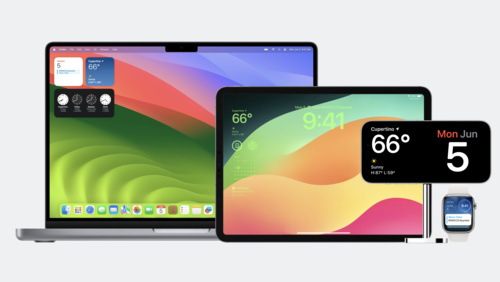
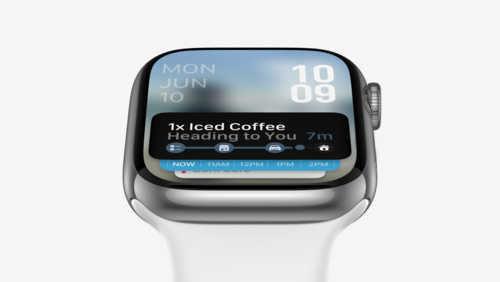
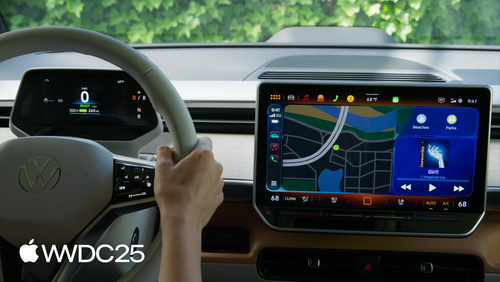
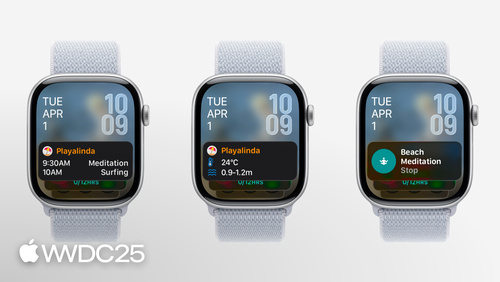
WidgetKit elevates your app with updates to widgets, Live Activities, and controls. Learn how to bring your widgets to visionOS, take them on the road with CarPlay, and make them look their best with accented rendering modes. Plus, find out how relevant widgets can be surfaced in the Smart Stack on watchOS, and discover how push notifications can be used to keep your widgets up to date.
Watch at developer.apple.com ↗Chapters
Code shown on screen · 11 snippets
Observe .widgetRenderingMode
struct MostFrequentBeverageWidgetView: View {
(\.widgetRenderingMode) var renderingMode
var entry: Entry
var body: some View {
ZStack {
if renderingMode == .fullColor {
Image(entry.beverageImage)
.resizable()
.aspectRatio(contentMode: .fill)
LinearGradient(gradient: Gradient(colors: [.clear, .clear, .black.opacity(0.8)]), startPoint: .top, endPoint: .bottom)
}
VStack {
if renderingMode == .accented {
Image(entry.beverageImage)
.resizable()
.widgetAccentedRenderingMode(.desaturated)
.aspectRatio(contentMode: .fill)
}
BeverageTextView()
}
}
}
}visionOS Widget Configuration
struct CaffeineTrackerWidget: Widget {
    var body: some WidgetConfiguration {
        StaticConfiguration(
            kind: "BaristaWidget",
            provider: Provider()
        ) { entry in
            CaffeineTrackerWidgetView(entry: entry)
        }
        .configurationDisplayName("Caffeine Tracker")
        .description("A widget tracking your caffeine intake during the day.")
        .supportedMountingStyles([.elevated])
        .widgetTexture(.paper)
        .supportedFamilies([.systemExtraLargePortrait])
    }
}
LevelOfDetail - CaffeineTrackerWidgetView
struct CaffeineTrackerWidgetView : View {
(\.levelOfDetail) var levelOfDetail
var entry: CaffeineLogEntry
var body: some View {
VStack(alignment: .leading) {
TotalCaffeineView(entry: entry)
if let log = entry.log {
LastDrinkView(log: log)
}
if levelOfDetail == .default {
LogDrinkView()
}
}
}
}LevelOfDetail - TotalCaffeineView
struct TotalCaffeineView: View {
(\.levelOfDetail) var levelOfDetail
let entry: CaffeineLogEntry
var body: some View {
VStack {
Text("Total Caffeine")
.font(.caption)
Text(totalCaffeine.formatted())
.font(caffeineFont)
}
}
var caffeineFont: Font {
if levelOfDetail == .simplified {
.largeTitle
} else {
.title
}
}
var totalCaffeine: Measurement<UnitMass> {
entry.totalCaffeine
}
}Add .supplementalActivityFamilies
struct ShopOrderLiveActivity: Widget {
    var body: some WidgetConfiguration {
        ActivityConfiguration(for: Attributes.self) { context in
            ActivityView(context: context)
        } dynamicIsland: { context in
            DynamicIsland {
                DynamicIslandExpandedRegion(.leading) {
                    ExpandedView(context: context)
                }
            } compactLeading: {
                LeadingView(context: context)
            } compactTrailing: {
                TrailingView(context: context)
            } minimal: {
                MinimalView(context: context)
            }
        }
        .supplementalActivityFamilies([.small])
    }
}
Add .activityFamily
struct ActivityView: View {
(\.activityFamily) var activityFamily
var context: ActivityViewContext<Attributes>
var body: some View {
switch activityFamily {
case .small:
ShopOrderSmallView(context: context)
default:
ShopOrderView(context: context)
}
}
}Define relevance widget with RelevanceConfiguration
struct HappyHourRelevanceWidget: Widget {
    var body: some WidgetConfiguration {
        RelevanceConfiguration(
            kind: "HappyHour",
            provider: Provider()
        ) { entry in
            WidgetView(entry: entry)
        }
    }
}
Implement RelevanceEntriesProvider
struct Provider: RelevanceEntriesProvider {
    func placeholder(context: Context) -> Entry {
        Entry()
    }

    func relevance() async -> WidgetRelevance<Configuration> {
        let configs = await fetchConfigs()
        var attributes: [WidgetRelevanceAttribute<Configuration>] = []

        for config in configs {
            attributes.append(WidgetRelevanceAttribute(
                configuration: config,
                context: .date(interval: config.interval, kind: .default)))
        }

        return WidgetRelevance(attributes)
    }

    func entry(configuration: Configuration,
               context: RelevanceEntriesProviderContext) async throws -> Entry {
        Entry(shop: configuration.shop, timeRange: configuration.timeRange)
    }
}
Handle push token and widget configuration changes
struct CaffeineTrackerPushHandler: WidgetPushHandler {
    func pushTokenDidChange(_ pushInfo: WidgetPushInfo, widgets: [WidgetInfo]) {
        // Send push token and subscription info to server
    }
}
Add pushHandler to WidgetConfiguration
struct CaffeineTrackerWidget: Widget {
    var body: some WidgetConfiguration {
        StaticConfiguration(
            kind: Constants.widgetKind,
            provider: Provider()
        ) { entry in
            CaffeineTrackerWidgetView(entry: entry)
        }
        .configurationDisplayName("Caffeine Tracker")
        .pushHandler(CaffeineTrackerPushHandler.self)
    }
}
Push Notification Request Body
{
    "aps": {
        "content-changed": true
    }
}
Resources
Related sessions
-
 21 min
 -
 7 min
7 min -
 9 min
9 min -
 22 min
 -
 18 min
 -
 21 min
 -
 12 min
 -
 12 min