2025 Graphics & GamesSpatial Computing
WWDC25 · 26 min · Graphics & Games / Spatial Computing
What’s new in RealityKit
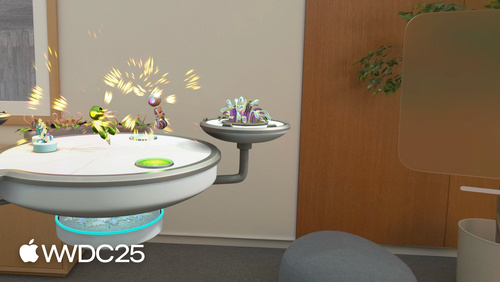
Unleash your creativity with new RealityKit features that can help you build rich 3D content for iOS, iPadOS, macOS, tvOS and visionOS. Learn how you can access ARKit data directly through RealityKit. Explore how you can interact with your 3D content more naturally using the object manipulation feature. Discover some new APIs for scene understanding, environment blending, instancing and much more, all using an interactive sample.
Watch at developer.apple.com ↗Chapters
Code shown on screen · 15 snippets
Set up SpatialTrackingSession
// Set up SpatialTrackingSession
var spatialTrackingSession = SpatialTrackingSession()
RealityView { content in
let configuration = SpatialTrackingSession.Configuration(
tracking: [.plane]
)
// Run the configuration
if let unavailableCapabilities = await spatialTrackingSession.run(configuration) {
// Handle errors
}
}Set up PlaneAnchor
// Set up PlaneAnchor
RealityView { content in

		// Set up the SpatialTrackingSession

    // Add a PlaneAnchor
    let planeAnchor = AnchorEntity(.plane(.horizontal,
                                          classification: .table,
                                          minimumBounds: [0.15, 0.15]))
    content.add(planeAnchor)
}
Handle DidAnchor event
// Handle DidAnchor event

		didAnchor = content.subscribe(to: AnchorStateEvents.DidAnchor.self) { event in

		guard let anchorComponent =
           event.entity.components[ARKitAnchorComponent.self] else { return }


		guard let planeAnchor = anchorComponent.anchor as? PlaneAnchor else { return }

		let worldSpaceFromExtent =
    planeAnchor.originFromAnchorTransform *
    planeAnchor.geometry.extent.anchorFromExtentTransform

    gameRoot.transform = Transform(matrix: worldSpaceFromExtent)

    // Add game objects to gameRoot
}
Set up ManipulationComponent
// Set up ManipulationComponent
extension Entity {
    static func loadModelAndSetUp(modelName: String,
                                  in bundle: Bundle) async throws -> Entity {

        let entity = // Load model and assign PhysicsBodyComponent
        let shapes = // Generate convex shape that fits the entity model

        // Initialize manipulation
        ManipulationComponent.configureEntity(entity, collisionShapes: [shapes])
        var manipulationComponent = ManipulationComponent()
        manipulationComponent.releaseBehavior = .stay
        entity.components.set(manipulationComponent)

        // Continue entity set up
    }
}
Subscribe to willBegin ManipulationEvent
// Subscribe to ManipulationEvents

// Update the PhysicsBodyComponent to support movement
willBegin = content.subscribe(to: ManipulationEvents.WillBegin.self) { event in
    if var physicsBody = event.entity.components[PhysicsBodyComponent.self] {
        physicsBody.mode = .kinematic
        event.entity.components.set(physicsBody)
    }
}
Subscribe to willEnd ManipulationEvent
// Subscribe to ManipulationEvents

// Update the PhysicsBodyComponent to be a dynamic object
willEnd = content.subscribe(to: ManipulationEvents.WillEnd.self) { event in
    if var physicsBody = event.entity.components[PhysicsBodyComponent.self] {
        physicsBody.mode = .dynamic
        event.entity.components.set(physicsBody)
    }
}
Set up Scene understanding mesh collision and physics
// Set up Scene understanding mesh collision/physics

let configuration = SpatialTrackingSession.Configuration(
    tracking: [.plane],
    sceneUnderstanding: [.collision, .physics]
)
Set up EnvironmentBlendingComponent
// Set up EnvironmentBlendingComponent
entity.components.set(
EnvironmentBlendingComponent(preferredBlendingMode: .occluded(by: .surroundings))
)Set up MeshInstancesComponent
// Set up MeshInstancesComponent entity

let entity = try await ModelEntity(named:"PebbleStriped.usdz")
var meshInstancesComponent = MeshInstancesComponent()
let instances = try LowLevelInstanceData(instanceCount: 20)
meshInstancesComponent[partIndex: 0] = instances

instances.withMutableTransforms { transforms in
    for i in 0..<20 {
        let scale: Float = .random(in:0.018...0.025)
        let angle: Float = .random(in:0..<2) * .pi
        let position = randomPoint(in: inArea, with: scene)
        let transform = Transform(scale: .init(repeating: scale),
                                  rotation: .init(angle: angle,axis: [0, 1, 0]),
                                  translation: position)
        transforms[i] = transform.matrix
    }
}

entity.components.set(meshInstancesComponent)
Load and display a 2D photo
// Load and display a 2D photo
guard let url = Bundle.main.url(forResource: "my2DPhoto", withExtension: "heic") else {a
return
}
let component = try await ImagePresentationComponent(contentsOf: url)
let entity = Entity()
entity.components.set(component)Load and display a spatial photo with windowed presentation
// Load and display a spatial photo with windowed presentation

guard let url = Bundle.main.url(forResource: "mySpatialPhoto", withExtension: "heic") else {
    return
}

var component = try await ImagePresentationComponent(contentsOf: url)

// Discover if the component supports windowed spatial photo presentation.
if component.availableViewingModes.contains(.spatialStereo) {
    component.desiredViewingMode = .spatialStereo
}

entity.components.set(component)
Load and display a spatial photo with immserive presentation
// Load and display a spatial photo with immersive presentation

guard let url = Bundle.main.url(forResource: "mySpatialPhoto", withExtension: "heic") else {
    return
}

var component = try await ImagePresentationComponent(contentsOf: url)

// Discover if the component supports immersive spatial photo presentation.
if component.availableViewingModes.contains(.spatialStereoImmersive) {
    component.desiredViewingMode = .spatialStereoImmersive
}

entity.components.set(component)
Load a spatial photo and use it to generate and present a spatial scene
// Load a spatial photo and use it to generate and present a spatial scene

guard let url = Bundle.main.url(forResource: "mySpatialPhoto", withExtension: "heic") else {
    return
}

let spatial3DImage = try await ImagePresentationComponent.Spatial3DImage(contentsOf: url)
var component = ImagePresentationComponent(spatial3DImage: spatial3DImage)

try await spatial3DImage.generate()

// Discover if the component supports windowed spatial scene presentation.
if component.availableViewingModes.contains(.spatial3D) {
    component.desiredViewingMode = .spatial3D
}

entity.components.set(component)
Generating a spatial scene as needed
// Load a spatial photo and use it to generate and present a spatial scene

guard let url = Bundle.main.url(forResource: "mySpatialPhoto", withExtension: "heic") else {
    return
}

let spatial3DImage = try await ImagePresentationComponent.Spatial3DImage(contentsOf: url)
var component = ImagePresentationComponent(spatial3DImage: spatial3DImage)

component.desiredViewingMode = .spatial3D // (or .spatial3DImmersive)

entity.components.set(component)

try await spatial3DImage.generate()
Load entity from Data object
// Load entity from Data object

if let (data, response) = try? await URLSession.shared.data(from: url) {
    if let entity = try? await Entity(from: data) {
        content.add(entity)
    }
}
Resources
Related sessions
-
 30 min
 -
 26 min
 -
 18 min