2025 Graphics & GamesAI & Machine Learning
WWDC25 · 30 min · Graphics & Games / AI & Machine Learning
Combine Metal 4 machine learning and graphics
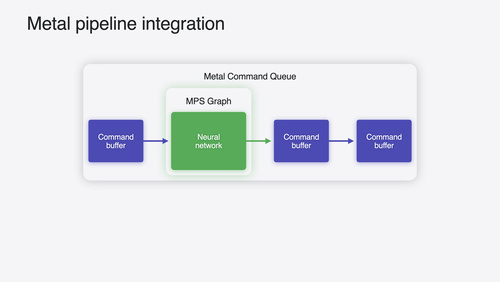
Learn how to seamlessly combine machine learning into your graphics applications using Metal 4. We’ll introduce the tensor resource and ML encoder for running models on the GPU timeline alongside your rendering and compute work. Discover how shader ML lets you embed neural networks directly within your shaders for advanced effects and performance gains. We’ll also show new debugging tools for Metal 4 ML workloads in action using an example app.
Watch at developer.apple.com ↗Chapters
Code shown on screen · 10 snippets
Exporting a Core ML package with PyTorch
import coremltools as ct

# define model in PyTorch
# export model to an mlpackage

model_from_export = ct.convert(
    custom_traced_model,
    inputs=[...],
    outputs=[...],
    convert_to='mlprogram',
    minimum_deployment_target=ct.target.macOS16,
)

model_from_export.save('model.mlpackage')
Identifying a network in a Metal package
library = [device newLibraryWithURL:@"myNetwork.mtlpackage"];

functionDescriptor = [MTL4LibraryFunctionDescriptor new]
functionDescriptor.name = @"main";
functionDescriptor.library = library;
Creating a pipeline state
descriptor = [MTL4MachineLearningPipelineDescriptor new];
descriptor.machineLearningFunctionDescriptor = functionDescriptor;

[descriptor setInputDimensions:dimensions
                 atBufferIndex:1];

pipeline = [compiler newMachineLearningPipelineStateWithDescriptor:descriptor
                                                             error:&error];
Dispatching a network
commands = [device newCommandBuffer];
[commands beginCommandBufferWithAllocator:cmdAllocator];
[commands useResidencySet:residencySet];

/* Create intermediate heap */
/* Configure argument table */

encoder = [commands machineLearningCommandEncoder];
[encoder setPipelineState:pipeline];
[encoder setArgumentTable:argTable];
[encoder dispatchNetworkWithIntermediatesHeap:heap];
Creating a heap for intermediate storage
heapDescriptor = [MTLHeapDescriptor new];
heapDescriptor.type = MTLHeapTypePlacement;
heapDescriptor.size = pipeline.intermediatesHeapSize;

heap = [device newHeapWithDescriptor:heapDescriptor];
Submitting commands to the GPU timeline
commands = [device newCommandBuffer];
[commands beginCommandBufferWithAllocator:cmdAllocator];
[commands useResidencySet:residencySet];

/* Create intermediate heap */
/* Configure argument table */

encoder = [commands machineLearningCommandEncoder];
[encoder setPipelineState:pipeline];
[encoder setArgumentTable:argTable];
[encoder dispatchNetworkWithIntermediatesHeap:heap];

[commands endCommandBuffer];
[queue commit:&commands count:1];
Synchronization
[encoder barrierAfterStages:MTLStageMachineLearning
          beforeQueueStages:MTLStageVertex
          visibilityOptions:MTL4VisibilityOptionDevice];
Declaring a fragment shader with tensor inputs
// Metal Shading Language 4
using namespace metal;
[[fragment]]
float4 shade_frag(tensor<device half, dextents<int, 2>> layer0Weights [[ buffer(0) ]],
tensor<device half, dextents<int, 2>> layer1Weights [[ buffer(1) ]],
/* other bindings */)
{
// Creating input tensor
half inputs[INPUT_WIDTH] = { /* four latent texture samples + UV data */ };
auto inputTensor = tensor(inputs, extents<int, INPUT_WIDTH, 1>());
...
}Operating on tensors in shaders
// Metal Shading Language 4
using namespace mpp;
constexpr tensor_ops::matmul2d_descriptor desc(
/* M, N, K */ 1, HIDDEN_WIDTH, INPUT_WIDTH,
/* left transpose */ false,
/* right transpose */ true,
/* reduced precision */ true);
tensor_ops::matmul2d<desc, execution_thread> op;
op.run(inputTensor, layerN, intermediateN);
for (auto intermediateIndex = 0; intermediateIndex < intermediateN(0); ++intermediateIndex)
{
intermediateN[intermediateIndex, 0] = max(0.0f, intermediateN[intermediateIndex, 0]);
}Render using network evaluation
half3 baseColor          = half3(outputTensor[0,0], outputTensor[1,0], outputTensor[2,0]);
half3 tangentSpaceNormal = half3(outputTensor[3,0], outputTensor[4,0], outputTensor[5,0]);

half3 worldSpaceNormal = worldSpaceTBN * tangentSpaceNormal;

return baseColor * saturate(dot(worldSpaceNormal, worldSpaceLightDir));
Resources
Related sessions
-
 24 min
 -
 25 min
 -
 32 min
 -
 27 min
 -
 25 min
 -
 18 min