2025 AI & Machine Learning
WWDC25 · 25 min · AI & Machine Learning
Get to know App Intents
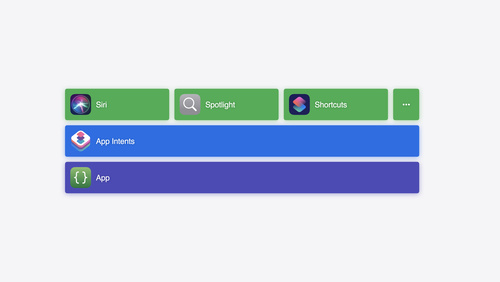
Learn about the App Intents framework and its increasingly critical role within Apple’s developer platforms. We’ll take you through a ground-up introduction of the core concepts: intents, entities, queries, and much more. You’ll learn how these pieces fit together and let you integrate your app through Apple’s devices, from software features like Spotlight and Shortcuts to hardware features like the Action button. We’ll also walk through how App Intents is your app’s gateway to integrating with Apple Intelligence going forward.
Watch at developer.apple.com ↗Chapters
Code shown on screen · 21 snippets
Navigate Intent
struct NavigateIntent: AppIntent {
static let title: LocalizedStringResource = "Navigate to Landmarks"
static let supportedModes: IntentModes = .foreground
func perform() async throws -> some IntentResult {
Navigator.shared.navigate(to: .landmarks)
return .result()
}
}Navigation Option App Enum
enum NavigationOption: String, AppEnum {
    case landmarks
    case map
    case collections

    static let typeDisplayRepresentation: TypeDisplayRepresentation = "Navigation Option"

    static let caseDisplayRepresentations: [NavigationOption: DisplayRepresentation] = [
        .landmarks: "Landmarks",
        .map: "Map",
        .collections: "Collections"
    ]
}
Navigate Intent with Parameter
struct NavigateIntent: AppIntent {
static let title: LocalizedStringResource = "Navigate to Section"
static let supportedModes: IntentModes = .foreground
var navigationOption: NavigationOption
func perform() async throws -> some IntentResult {
Navigator.shared.navigate(to: navigationOption)
return .result()
}
}Case Display Representations with Images
static let caseDisplayRepresentations = [
    NavigationOption.landmarks: DisplayRepresentation(
        title: "Landmarks",
        image: .init(systemName: "building.columns")
    ),
    NavigationOption.map: DisplayRepresentation(
        title: "Map",
        image: .init(systemName: "map")
    ),
    NavigationOption.collections: DisplayRepresentation(
        title: "Collections",
        image: .init(systemName: "book.closed")
    )
]
Navigation Option With Parameter Summary
struct NavigateIntent: AppIntent {
static let title: LocalizedStringResource = "Navigate to Section"
static let supportedModes: IntentModes = .foreground
static var parameterSummary: some ParameterSummary {
Summary("Navigate to \(\.$navigationOption)")
}
(
title: "Section",
requestValueDialog: "Which section?"
)
var navigationOption: NavigationOption
func perform() async throws -> some IntentResult {
Navigator.shared.navigate(to: navigationOption)
return .result()
}
}App Shortcuts Provider and Navigation Intent App Shortcut
struct TravelTrackingAppShortcuts: AppShortcutsProvider {
    static var appShortcuts: [AppShortcut] {
        AppShortcut(
            intent: NavigateIntent(),
            phrases: [
                "Navigate in \(.applicationName)",
                "Navigate to \(\.$navigationOption) in \(.applicationName)"a
            ],
            shortTitle: "Navigate",
            systemImageName: "arrowshape.forward"
        )
    }
}
Landmark Entity
struct LandmarkEntity: AppEntity {
var id: Int { landmark.id }
var name: String { landmark.name }
var description: String { landmark.description }
let landmark: Landmark
static let typeDisplayRepresentation = TypeDisplayRepresentation(name: "Landmark")
var displayRepresentation: DisplayRepresentation {
DisplayRepresentation(title: "\(name)")
}
static let defaultQuery = LandmarkEntityQuery()
}Landmark Entity Query
struct LandmarkEntityQuery: EntityQuery {
var modelData: ModelData
func entities(for identifiers: [LandmarkEntity.ID]) async throws -> [LandmarkEntity] {
modelData
.landmarks(for: identifiers)
.map(LandmarkEntity.init)
}
}App Dependency Manager
@main
struct LandmarksApp: App {
    init() {
        AppDependencyManager.shared.add { ModelData() }
    }
}
Closest Landmark Intent
struct ClosestLandmarkIntent: AppIntent {
static let title: LocalizedStringResource = "Find Closest Landmark"
var modelData: ModelData
func perform() async throws
-> some ReturnsValue<LandmarkEntity> & ProvidesDialog & ShowsSnippetView {
let landmark = try await modelData.findClosestLandmark()
return .result(
value: landmark,
dialog: "The closest landmark to you is \(landmark.name)",
view: ClosestLandmarkView(landmark: landmark)
)
}
}Closest Landmark App Shortcut
AppShortcut(
    intent: ClosestLandmarkIntent(),
    phrases: [
        "Find closest landmark in \(.applicationName)"
    ],
    shortTitle: "Closest landmark",
    systemImageName: "location"
)
Transferable
extension LandmarkEntity: Transferable {
    static var transferRepresentation: some TransferRepresentation {
        DataRepresentation(exportedContentType: .image) {
            return try $0.imageRepresentationData
        }
    }
}
Indexed Entity
struct LandmarkEntity: IndexedEntity {
// ...
(
indexingKey: \.displayName
)
var name: String
(
indexingKey: \.contentDescription
)
var description: String
}Open Landmark Intent
struct OpenLandmarkIntent: OpenIntent, TargetContentProvidingIntent {
static let title: LocalizedStringResource = "Open Landmark"
(title: "Landmark", requestValueDialog: "Which landmark?")
var target: LandmarkEntity
}
struct LandmarksNavigationStack: View {
var path: [Landmark] = []
var body: some View {
NavigationStack(path: $path) {}
.onAppIntentExecution(OpenLandmarkIntent.self) { intent in
path.append(intent.target.landmark)
}
}
}Open Landmark App Shortcut
AppShortcut(
    intent: OpenLandmarkIntent(),
    phrases: [
        "Open \(\.$target) in \(.applicationName)",
        "Open landmark in \(.applicationName)"
    ],
    shortTitle: "Open",
    systemImageName: "building.columns"
)
Suggested Entities
struct LandmarkEntityQuery: EntityQuery {
    // ...

    func suggestedEntities() async throws -> [LandmarkEntity] {
        modelData
            .favoriteLandmarks()
            .map(LandmarkEntity.init)
    }
}
Update App Shortcut Parameters
TravelTrackingAppShortcuts.updateAppShortcutParameters()EnumerableEntityQuery
extension LandmarkEntityQuery: EnumerableEntityQuery {
    func allEntities() async throws -> [LandmarkEntity] {
        // ...
    }
}
EntityPropertyQuery
extension LandmarkEntityQuery: EntityPropertyQuery {
    static var properties = QueryProperties {
        // ...
    }

    static var sortingOptions = SortingOptions {
        // ...
    }

    func entities(
        matching comparators: [Predicate<LandmarkEntity>],
        mode: ComparatorMode,
        sortedBy: [Sort<LandmarkEntity>],
        limit: Int?
    ) async throws -> [LandmarkEntity] {
        // ...
    }
}
EntityStringQuery
extension LandmarkEntityQuery: EntityStringQuery {
    func entities(matching: String) async throws -> [LandmarkEntity] {
        modelData
            .landmarks
            .filter { $0.name.contains(matching) || $0.description.contains(matching) }
            .map(LandmarkEntity.init)
    }
}
App Intents Package
// TravelTrackingKit
public struct TravelTrackingKitPackage: AppIntentsPackage {}
public structaLandmarkEntity: AppEntity {}

// TravelTracking
struct TravelTrackingPackage: AppIntentsPackage {
    static var includedPackages: [any AppIntentsPackage.Type] {
        [TravelTrackingKitPackage.self]
    }
}
struct OpenLandmarkIntent: OpenIntent {}

// TravelTrackingAppIntentsExtension
struct TravelTrackingExtensionPackage: AppIntentsPackage {
    static var includedPackages: [any AppIntentsPackage.Type] {
        [TravelTrackingKitPackage.self]
    }
}
struct FavoriteLandmarkIntent: AppIntent {}
Resources
- Adopting App Intents to support system experiences
- Building a workout app for iPhone and iPad
- Accelerating app interactions with App Intents
- App schema domains
- Creating your first app intent
- Integrating your app with Siri and Apple Intelligence
- Making actions and content discoverable and widely available
- App Shortcuts
- App Intents
Related sessions
-
 26 min
 -
 9 min
9 min -
 18 min
 -
 22 min
 -
 19 min
 -
 7 min
7 min