2024 Developer ToolsGraphics & GamesSpatial Computing
WWDC24 · 32 min · Developer Tools / Graphics & Games / Spatial Computing
Discover RealityKit APIs for iOS, macOS, and visionOS
Learn how new cross-platform APIs in RealityKit can help you build immersive apps for iOS, macOS, and visionOS. Check out the new hover effects, lights and shadows, and portal crossing features, and view them in action through real examples.
Watch at developer.apple.com ↗Chapters
Code shown on screen · 13 snippets
Add a highlight HoverEffectComponent
// Add a highlight HoverEffectComponent

let highlightStyle = HoverEffectComponent.HighlightHoverEffectStyle(color: .lightYellow,
                                                                    strength: 0.8)
let hoverEffect = HoverEffectComponent(.highlight(highlightStyle))
spaceship.components.set(hoverEffect)
Add a shader effect
// Add a shader effect

let hoverEffect = HoverEffectComponent(.shader(.default))
spaceship.components.set(hoverEffect)
Control acceleration with left hand
// Control acceleration with left hand

class HandTrackingSystem: System {

    func update(context: SceneUpdateContext) {
        let indexTipPosition = indexTipEntity.position(relativeTo: nil)
        let thumbTipPosition = thumbTipEntity.position(relativeTo: nil)

        let distance = distance(indexTipPosition, thumbTipPosition)

        let throttle = computeThrottle(with: distance)

        let force = spaceship.transform.forward * throttle
        spaceship.addForce(force, relativeTo: nil)
    }
}
Adding a gravity force effect
// Adding a gravity force effect

struct Gravity: ForceEffectProtocol {

    var parameterTypes: PhysicsBodyParameterTypes { [.position, .distance] }
    var forceMode: ForceMode = .force

    func update(parameters: inout ForceEffectParameters) {
        guard let distances = parameters.distances,
              let positions = parameters.positions else { return }

        for i in 0..<parameters.physicsBodyCount {
            let force = computeForce(distances[i], positions[i])
            parameters.setForce(force, index: i)
        }
    }
}
Activating the gravity force effect
// Activating the gravity force effect

let gravity = ForceEffect(effect: Gravity(),
                          spatialFalloff: SpatialForceFalloff(bounds: .sphere(radius: 8.0)),
                          mask: .asteroids)

planet.components.set(ForceEffectComponent(effects: [gravity]))
Using PhysicsMotionComponent
// Calculate initial velocity of the asteroid using radius and angle

let velocity = calculateVelocity(radius, angle)

let physicsMotion = PhysicsMotionComponent(linearVelocity: velocity)
asteroid.components.set(physicsMotion)
// Add a custom joint
// Add a custom joint

guard let hookEntity = spaceship.findEntity(named: "Hook") else { return }
let hookOffset: SIMD3<Float> = hookEntity.position(relativeTo: spaceship)

let hookPin = spaceship.pins.set(named: "Hook", position: hookOffset)
let trailerPin = trailer.pins.set(named: "Trailer", position: .zero)

var joint = PhysicsCustomJoint(pin0: hookPin, pin1: trailerPin)

joint.angularMotionAroundX = .range(-.pi * 0.05 ... .pi * 0.05)
joint.angularMotionAroundY = .range(-.pi * 0.2 ... .pi * 0.2)
joint.angularMotionAroundZ = .range(-.pi * 0.2 ... .pi * 0.2)

joint.linearMotionAlongX = .fixed
joint.linearMotionAlongY = .fixed
joint.linearMotionAlongZ = .fixed

try joint.addToSimulation()
// Add a spotlight with shadow
// Add a spotlight with shadow

guard let lightEntity = spaceship.findEntity(named: "HeadLight") else { return }

lightEntity.components.set(SpotLightComponent(color: .yellow,
                                              intensity: 10000.0,
                                              attenuationRadius: 6.0))

lightEntity.components.set(SpotLightComponent.Shadow())
Disable shadow
// Disable shadow

let component = DynamicLightShadowComponent(
                    castsShadow: false)

entity.components.set(component)
Enable portal crossing
// Enable portal crossing

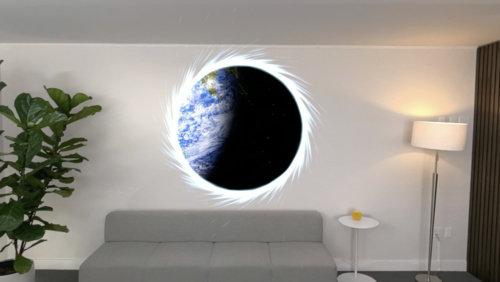
portal.components.set(PortalComponent(target: portalWorld,
                                      clippingMode: .plane(.positiveZ),
                                      crossingMode: .plane(.positiveZ)))

spaceship.components.set(PortalCrossingComponent())
Configure environmental lighting on the spaceship
// Configure environmental lighting on the spaceship

var lightingConfig = EnvironmentLightingConfigurationComponent()

let distance: Float = computeShipDistanceFromPortal()
lightingConfig.environmentLightingWeight = mapDistanceToWeight(distance)

spaceship.components.set(lightingConfig)
World tracking camera
// World tracking camera

RealityView { content in

#if os(iOS)

    content.camera = .worldTracking

#endif

}
Multi-touch control views
// Multi-touch control views

#if os(iOS)

struct MultiTouchControlView : View {

    var body: some View {

        HStack {

            ThrottleControlView()

            Spacer()

            PitchRollControlView()

        }
    }

#endif
Resources
Related sessions
-
 32 min
 -
 23 min
 -
 21 min
 -
 35 min
 -
 38 min