2020 SwiftUI & UI FrameworksGraphics & Games
WWDC20 · 14 min · SwiftUI & UI Frameworks / Graphics & Games
Bring keyboard and mouse gaming to iPad
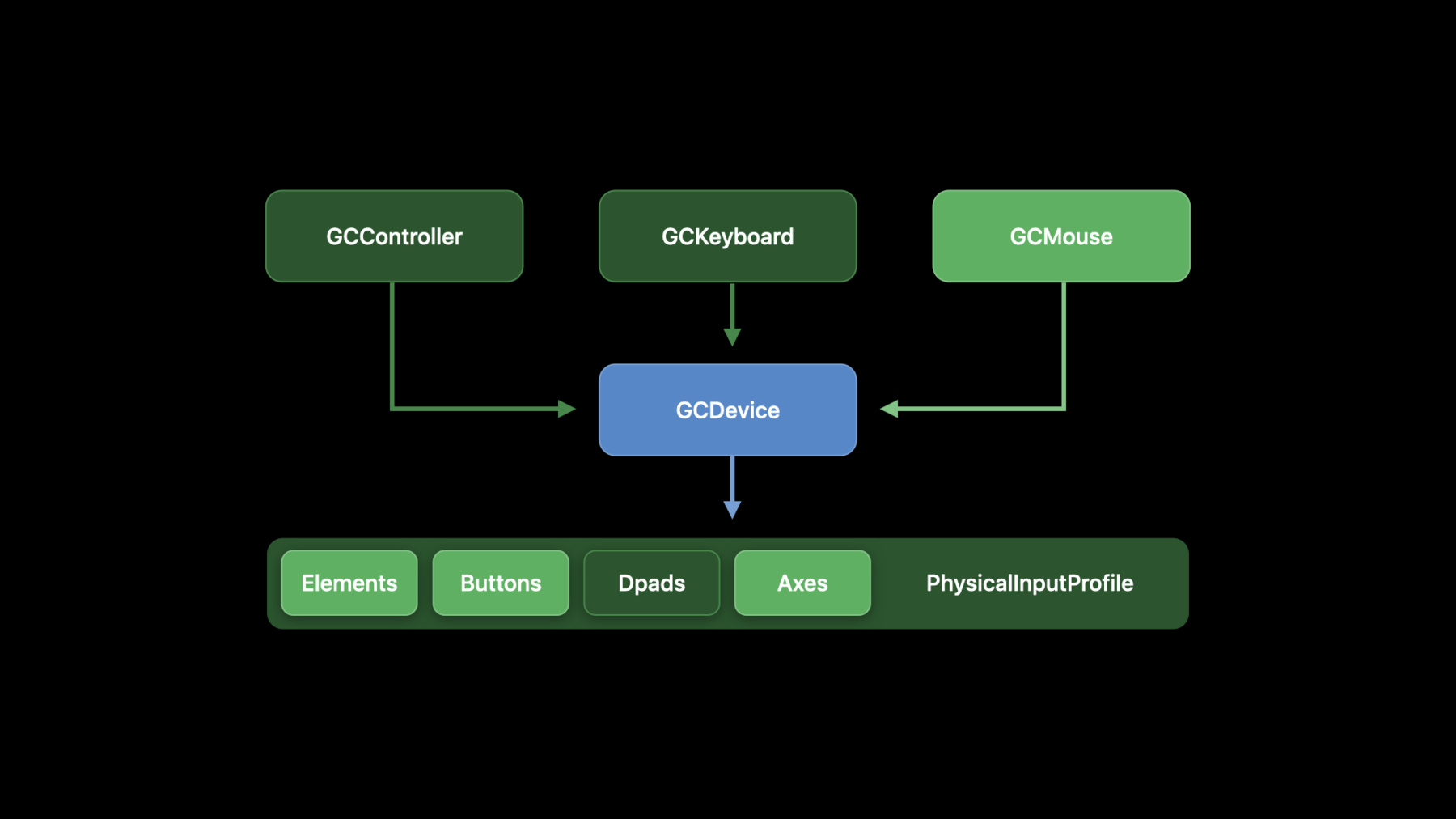
Level up your iPad games and add in keyboard, mouse, and trackpad controls. Discover how to use the Game Controller framework to augment your existing titles, bring over games from other platforms, or dream up entirely new interaction experiences. Learn how to integrate keyboard and “delta” mouse coordinate events for player motion, and disable pointer system gestures like the Dock or Control Center to take full advantage of full screen gameplay. For further information on adding support for console game controllers like the Xbox Elite Wireless Controller Series 2 and Xbox Adaptive Controller, watch “Advancements in Game Controllers.” And learn more about using UIKit to manage indirect input by checking out “Handle trackpad and mouse input”.
Watch at developer.apple.com ↗Code shown on screen · 6 snippets
Keyboard event change handlers
if let keyboard = GCKeyboardDevice.coalesced?.keyboardInput {

  // bind to any key-up/-down
  keyboard.keyChangedHandler = {
    (keyboard, key, keyCode, pressed) in
    // compare buttons to GCKeyCode
  }

  // bind to a specific key-up/-down
  keyboard.button(forKeyCode: .spacebar)?.valueChangedHandler = {
    (key, value, pressed) in
    // spacebar was pressed or released
  }

}
Polling keyboard state
func pollInput() {

  if let keyboard = GCKeyboardDevice.coalesced?.keyboardInput {
	  if (keyboard.button(forKeyCode: .keyW)?.isPressed ?? false) { /* move up    */ }
	  if (keyboard.button(forKeyCode: .keyA)?.isPressed ?? false) { /* move left  */ }
	  if (keyboard.button(forKeyCode: .keyS)?.isPressed ?? false) { /* move down  */ }
	  if (keyboard.button(forKeyCode: .keyD)?.isPressed ?? false) { /* move right */ }
  }

}
Mouse event change handlers
if let mouse = GCMouse.currentMouse {

   mouse.mouseInput.mouseMovedHandler = {
     (mouse, deltaX, deltaY) in
     // use delta to calculate your game's cursor position or other motion
   }

}
Pointer lock
class ViewController: UIViewController {

    override var prefersPointerLocked: Bool {
        return true
    }

    override func viewDidLoad() {
        super.viewDidLoad()
        self.setNeedsUpdateOfPrefersPointerLocked()
    }
}
Discovery
class ViewController: UIViewController {
  var keyboard: GCKeyboard? = nil
  var mouse: GCMouse? = nil

  init() {
    let center = NotificationCenter.defaultCenter
    let main = OperationQueue.mainQueue

    center.addObserverForName(GCMouseDidConnectNotification, object: nil, queue: main) {
      (note) in
      self.mouse = note.object as? GCMouse
    }

    center.addObserverForName(GCKeyboardDidConnectNotification, object: nil, queue: main) {
      (note) in
      self.keyboard = note.object as? GCKeyboard // the same as GCKeyboard.coalesced
    }

  }
}
Updating Fox 2
var delta: CGPoint = CGPoint.zero

func registerMouse(_ mouseDevice: GCMouse) {

  if #available(iOS 14.0, OSX 10.16, *) {
    guard let mouseInput = mouseDevice.mouseInput else {
      return
    }

    // set up our mouse value change handlers

  }
}

    weak var weakController = self

    mouseInput.mouseMovedHandler = {(mouse, deltaX, deltaY) in
      guard let strongController = weakController else {
        return
      }

      strongController.delta = CGPoint(x: CGFloat(deltaX), y: CGFloat(deltaY))

    }

    mouseInput.leftButton.valueChangedHandler = {(button, value, pressed) in
      guard let strongController = weakController else {
        return
      }

      strongController.controllerAttack()

    }

    mouseInput.scroll.valueChangedHandler = {(cursor, x, y) in
      guard let strongController = weakController else {
        return
      }
      guard let camera = strongController.cameraNode.camera else {
        return
      }

      camera.fieldOfView = CGFloat.maximum(CGFloat.minimum(120,
                                           camera.fieldOfView + CGFloat(y)), 30)

      }
    }

func pollInput() {
  ...

  // Mouse
  let mouseSpeed: CGFloat = 0.02
  self.cameraDirection += simd_make_float2(-Float(self.delta.x * mouseSpeed),
                                            Float(self.delta.y * mouseSpeed))
  self.delta = CGPoint.zero

  // Keyboard
  if let keyboard = GCKeyboard.coalesced?.keyboardInput {

      if (keyboard.button(forKeyCode: .keyA)?.isPressed ?? false) { self.characterDirection.x = -1.0 }
      if (keyboard.button(forKeyCode: .keyD)?.isPressed ?? false) { self.characterDirection.x = 1.0 }
      if (keyboard.button(forKeyCode: .keyW)?.isPressed ?? false) { self.characterDirection.y = -1.0 }
      if (keyboard.button(forKeyCode: .keyS)?.isPressed ?? false) { self.characterDirection.y = 1.0 }

      self.runModifier = (keyboard.button(forKeyCode: .leftShift)?.value ?? 0.0) + 1.0

  }
}
Resources
Related sessions
-
 15 min
 -
 24 min
 -
 12 min
 -
 18 min
 -
 25 min