2020 Developer ToolsGraphics & GamesAudio & Video
WWDC20 · 24 min · Developer Tools / Graphics & Games / Audio & Video
Decode ProRes with AVFoundation and VideoToolbox
Make decoding and displaying ProRes content easier in your Mac app: Learn how to implement an optimal graphics pipeline by leveraging AVFoundation and VideoToolbox’s decoding capabilities. We’ll share best practices and performance considerations for your app, show you how to integrate Afterburner cards into your pipeline, and walk through how you can display decoded frames using Metal.
Watch at developer.apple.com ↗Code shown on screen · 10 snippets
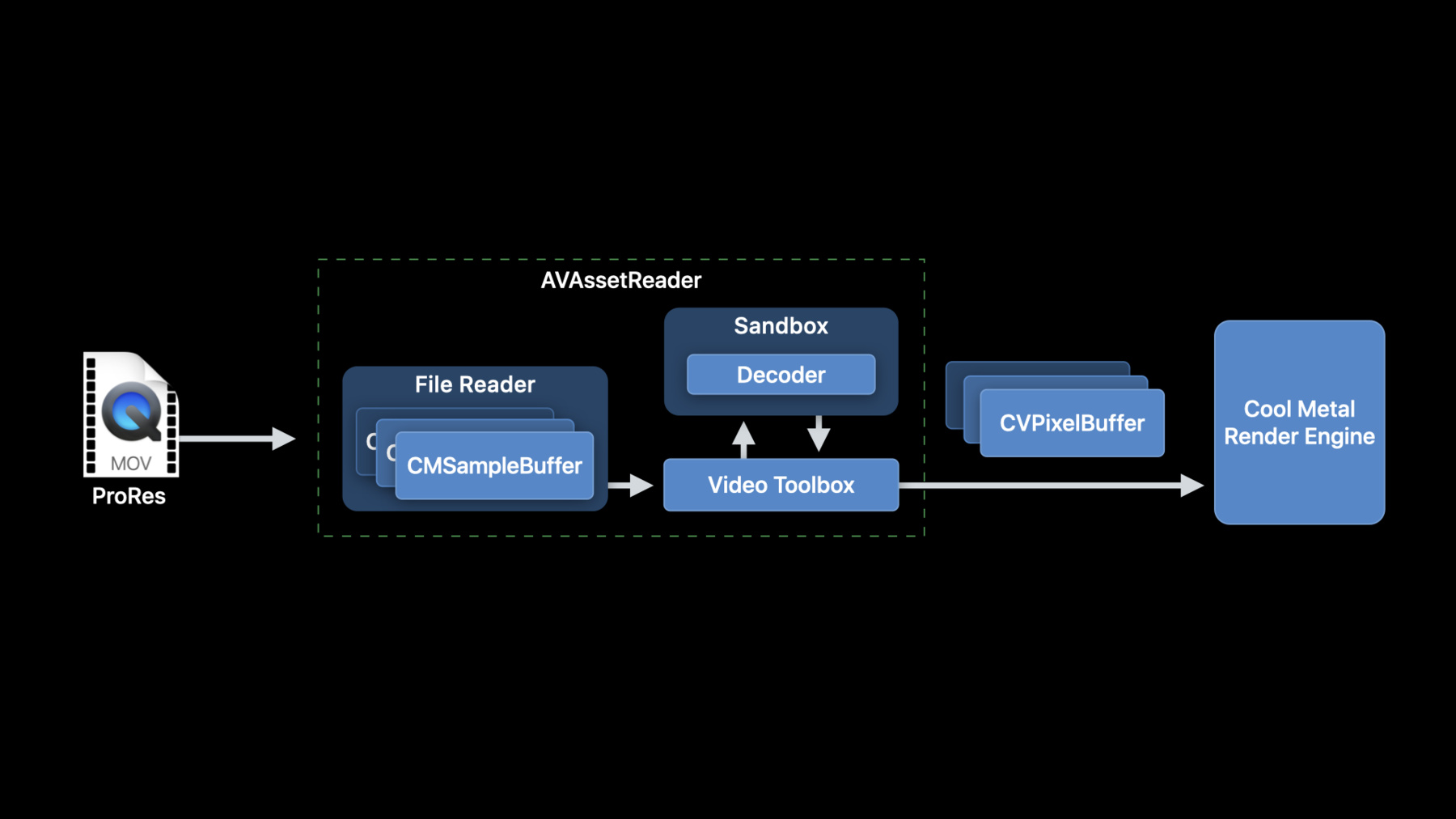
Creating an AVAssetReader is pretty easy
// Constructing an AVAssetReader

// Create an AVAsset with an URL pointing at a local asset
AVAsset *sourceMovieAsset = [AVAsset assetWithURL:sourceMovieURL];

// Create an AVAssetReader for the asset
AVAssetReader *assetReader = [AVAssetReader assetReaderWithAsset:sourceMovieAsset
                                                           error:&error];
// Configuring AVAssetReaderTrackOutput
// Configuring AVAssetReaderTrackOutput

// Copy the array of video tracks from the source movie
NSArray<AVAssetTrack*>  *tracks = [sourceMovieAsset tracksWithMediaType:AVMediaTypeVideo];

// Get the first video track
AVAssetTrack *track = [sourceMovieVideoTracks objectAtIndex:0];

// Create the asset reader track output for this video track, requesting ‘y416’ output
NSDictionary *outputSettings = @{ (id)kCVPixelBufferPixelFormatTypeKey :
                                  @(kCVPixelFormatType_4444AYpCbCr16) };

AVAssetReaderTrackOutput* assetReaderTrackOutput
= [AVAssetReaderTrackOutput assetReaderTrackOutputWithTrack:track
                                             outputSettings:outputSettings];

// Set the property to instruct the track output to return the samples
// without copying them
assetReaderTrackOutput.alwaysCopiesSampleData = NO;

// Connect the the AVAssetReaderTrackOutput to the AVAssetReader
[assetReader addOutput:assetReaderTrackOutput];
Running AVAssetReader
// Running AVAssetReader

BOOL success = [assetReader startReading];

if (success) {
   CMSampleBufferRef sampleBuffer = NULL;

   // output is a AVAssetReaderOutput
   while ((sampleBuffer = [output copyNextSampleBuffer]))
   {
       CVImageBufferRef imageBuffer = CMSampleBufferGetImageBuffer(sampleBuffer);

       if (imageBuffer)
       {
          // Use the image buffer here
          // if imageBuffer is NULL, this is likely a marker sampleBuffer
       }
    }
}
Prepareing CMSampleBuffers for optimized RPC transfer
AVAssetReaderTrackOutput* assetReaderTrackOutput
= [AVAssetReaderTrackOutput assetReaderTrackOutputWithTrack:track
                                             outputSettings:nil];
How an AVSampleBufferGenerator is created
AVSampleCursor* cursor = [assetTrack makeSampleCursorAtFirstSampleInDecodeOrder];

AVSampleBufferRequest* request = [[AVSampleBufferRequest alloc] initWithStartCursor:cursor];

request.direction = AVSampleBufferRequestDirectionForward;
request.preferredMinSampleCount = 1;
request.maxSampleCount = 1;

AVSampleBufferGenerator* generator
= [[AVSampleBufferGenerator alloc] initWithAsset:srcAsset timebase:nil];

BOOL notDone = YES;

while(notDone)
{
   CMSampleBufferRef sampleBuffer = [generator createSampleBufferForRequest:request];

   // do your thing with the sampleBuffer

   [cursor stepInDecodeOrderByCount:1];
}
Pack your sample data into a CMBlockBuffer
CMBlockBufferCreateWithMemoryBlock(kCFAllocatorDefault, sampleData, sizeof(sampleData),
                                   kCFAllocatorMalloc, NULL, 0, sizeof(sampleData), 0,
                                   &blockBuffer);

CMVideoFormatDescriptionCreate(kCFAllocatorDefault, kCMVideoCodecType_AppleProRes4444, 1920,
                               1080, extensionsDictionary, &formatDescription);

CMSampleTimingInfo timingInfo;

timingInfo.duration = CMTimeMake(10, 600);
timingInfo.presentationTimeStamp = CMTimeMake(frameNumber * 10, 600);

CMSampleBufferCreateReady(kCFAllocatorDefault, blockBuffer, formatDescription, 1, 1,
                          &timingInfo, 1, &sampleSize, &sampleBuffer);
VTDecompressionSession Creation
// VTDecompressionSession Creation

CMFormatDescriptionRef formatDesc = CMSampleBufferGetFormatDescription(sampleBuffer);

CFDictionaryRef pixelBufferAttributes = (__bridge CFDictionaryRef)@{
    (id)kCVPixelBufferPixelFormatTypeKey :
    @(kCVPixelFormatType_4444AYpCbCr16) };

VTDecompressionSessionRef decompressionSession;

OSStatus err = VTDecompressionSessionCreate(kCFAllocatorDefault,
                                            formatDesc,
                                            NULL,
                                            pixelBufferAttributes,
                                            NULL,
                                            &decompressionSession);
Running a VTDecompressionSession
// Running a VTDecompressionSession

uint32_t inFlags = kVTDecodeFrame_EnableAsynchronousDecompression;

VTDecompressionOutputHandler  outputHandler
 = ^(OSStatus status,
     VTDecodeInfoFlags infoFlags,
     CVImageBufferRef imageBuffer,
     CMTime presentationTimeStamp,
     CMTime presentationDurationVTDecodeInfoFlags)
 {
     // Handle decoder output in this block
     // Status reports any decoder errors
     // imageBuffer contains the decoded frame if there were no errors
 };

VTDecodeInfoFlags outFlags;

OSStatus err = VTDecompressionSessionDecodeFrameWithOutputHandler(decompressionSession,
                                                   sampleBuffer, inFlags,
                                                   &outFlags, outputHandler);
CVPixelBuffer to Metal texture: IOSurface
// CVPixelBuffer to Metal texture: IOSurface

IOSurfaceRef surface = CVPixelBufferGetIOSurface(imageBuffer);

id <MTLTexture> metalTexture = [metalDevice newTextureWithDescriptor:descriptor
                                                           iosurface:surface
                                                               plane:0];

// Mark the IOSurface as in-use so that it won’t be recycled by the CVPixelBufferPool
IOSurfaceIncrementUseCount(surface);

// Set up command buffer completion handler to decrement IOSurface use count again
[cmdBuffer addCompletedHandler:^(id<MTLCommandBuffer> buffer) {
     IOSurfaceDecrementUseCount(surface);
 }];
Create a CVMetalTextureCacheRef
// Create a CVMetalTextureCacheRef

CVMetalTextureCacheRef metalTextureCache = NULL;

id <MTLDevice> metalDevice = MTLCreateSystemDefaultDevice();

CVMetalTextureCacheCreate(kCFAllocatorDefault, NULL, metalDevice, NULL, &metalTextureCache);

// Create a CVMetalTextureRef using metalTextureCache and our pixelBuffer
CVMetalTextureCacheCreateTextureFromImage(kCFAllocatorDefault,
                                          metalTextureCache,
                                          pixelBuffer,
                                          NULL,
                                          pixelFormat,
                                          CVPixelBufferGetWidth(pixelBuffer),
                                          CVPixelBufferGetHeight(pixelBuffer),
                                          0,
                                          &cvTexture);

id <MTLTexture>  texture = CVMetalTextureGetTexture(cvTexture);
// Be sure to release the cvTexture object when the Metal command buffer completes!