2020 DesignSwiftUI & UI FrameworksAccessibility & Inclusion
WWDC20 · 15 min · Design / SwiftUI & UI Frameworks / Accessibility & Inclusion
App accessibility for Switch Control
Switch Control is a powerful accessibility technology for anyone with very limited mobility. The feature is available natively on iOS, and you can create an even better Switch Control experience in your app with tips, tricks, and a few APIs. We’ll walk you through how people use Switch Control, as well as provide best practices for supporting it in your app effectively. To get the most out of this session, you should be familiar with general accessibility principles and VoiceOver accessibility APIs. Check out "Making Apps More Accessible With Custom Actions," "Writing Great Accessibility Labels, and "VoiceOver: App Testing Beyond The Visuals" for more information.
Watch at developer.apple.com ↗Code shown on screen · 4 snippets
Navigation Style and Element Ordering
containerView.accessibilityNavigationStyle = .combined

containerView.accessibilityElements = [ levelFourView, levelFiveView, levelSixView]
Follow Focus API
// Following Focus API

class CardView : UIView {
    var orientation: CardOrientation

    enum CardOrientation {
        case front
        case back
    }

    override func accessibilityElementDidBecomeFocused() {
        self.flip(to: .front)
    }

		override func accessibilityElementDidLoseFocus() {
        self.flip(to: .back)
    }

// The rest of the class…
}
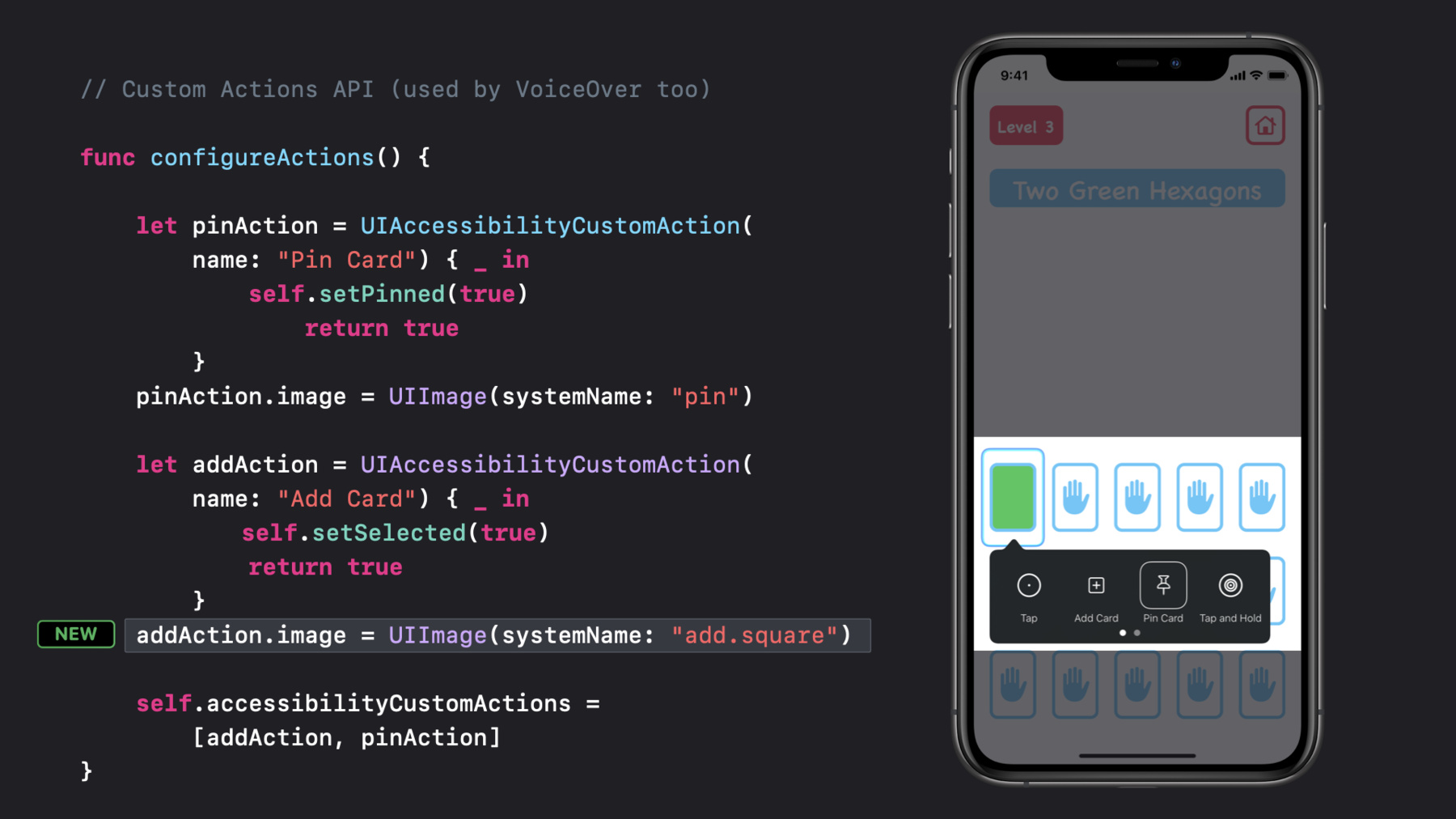
Custom Actions API
// Custom Actions API (VoiceOver uses this too)

func configureActions() {

  let pinAction = UIAccessibilityCustomAction(
      name: "Pin Card") { (_) -> Bool in
          self.setPinned(true)
          return true
      }
  pinAction.image = UIImage(systemName: "pin")

  let addAction = UIAccessibilityCustomAction(
      name: "Add Card") { (_) -> Bool in
          self.setSelected(true)
          return true
      }
    addAction.image = UIImage(systemName: "add.square")


	self.accessibilityCustomActions = [addAction, pinAction]
}
Other Useful API
static var isSwitchControlRunning: Bool { get }

var accessibilityRespondsToUserInteraction: Bool { get set }
Resources
Related sessions
-
 10 min
 -
 9 min
9 min -
 10 min
 -
 10 min