2020 Graphics & Games
WWDC20 · 21 min · Graphics & Games
Get to know Metal function pointers
Metal is a low-level, low-overhead hardware-accelerated graphics framework and shader application programming interface for producing stunning visual effects in applications. Discover how to make your shaders written in Metal Shading Language more programmable and extensible by using function pointers. Learn how to take advantage of this new feature for dynamic flow control in Metal shaders. Discover how to use function pointers to specify custom intersection functions in your ray tracing application. We’ll explain how function pointers allow several compilations models so you can balance GPU pipeline size against runtime performance.
Watch at developer.apple.com ↗Code shown on screen · 12 snippets
Our simple Path Tracer in Metal Shading Language:
float3 shade(...);

[[kernel]] void rtKernel(...
                         device Material *materials,
                         constant Light &light)
{
    // ...

    device Material &material = materials[intersection.geometry_id];
    float3 result = shade(ray, triangleIntersectionData, material, light);

    // ...
}
Our shading function
float3 shade(...)
{
    Lighting lighting = LightingFromLight(light, triangleIntersectionData);

    return CalculateLightingForMaterial(material, lighting, triangleIntersectionData);
}
Declare a function as visible
[[visible]]
Lighting Area(Light light, TriangleIntersectionData triangleIntersectionData)
{
    Lighting result;

    // Clever math code ...

    return result;
}
Single compilation pipeline on CPU
// Single compilation configuration
let linkedFunctions = MTLLinkedFunctions()
linkedFunctions.functions = [area, spot, sphere, hair, glass, skin]
computeDescriptor.linkedFunctions = linkedFunctions

// Pipeline creation
let pipeline = try device.makeComputePipelineState(descriptor: computeDescriptor,
                                                   options: [],
                                                   reflection: nil)
Introducing MTLFunctionDescriptor
// Create by function descriptor:
let functionDescriptor = MTLFunctionDescriptor()
functionDescriptor.name = "Area"
// More configuration goes here
let areaBinaryFunction = try library.makeFunction(descriptor: functionDescriptor)
Binary pre–compilation
// Create and compile by function descriptor:
let functionDescriptor = MTLFunctionDescriptor()
functionDescriptor.name = "Area"
functionDescriptor.options = MTLFunctionOptions.compileToBinary
let areaBinaryFunction = try library.makeFunction(descriptor: functionDescriptor)
Binary functions
// Specify binary functions on compute pipeline descriptor
let linkedFunctions = MTLLinkedFunctions()
linkedFunctions.functions = [spot, sphere, hair, glass, skin]
linkedFunctions.binaryFunctions = [areaBinaryFunction]
computeDescriptor.linkedFunctions = linkedFunctions

// Pipeline creation
let pipeline = try device.makeComputePipelineState(descriptor: computeDescriptor,
                                                   options: [],
                                                   reflection: nil)
Incremental compilation pipeline
// Create initial pipeline with option
computeDescriptor.supportAddingBinaryFunctions = true

// Create and compile by function descriptor
let functionDescriptor = MTLFunctionDescriptor()
functionDescriptor.name = "Wood"
functionDescriptor.options = MTLFunctionOptions.compileToBinary
let wood = try library.makeFunction(descriptor: functionDescriptor)

// Create new pipeline from existing pipeline
let newPipeline =
   try pipeline.makeComputePipelineStateWithAdditionalBinaryFunctions(functions: [wood])
Visible function tables on the GPU
// Helper using declaration in Metal
using LightingFunction = Lighting(Light, TriangleIntersectionData);
using MaterialFunction = float3(Material, Lighting, TriangleIntersectionData);

// Specify tables as kernel parameters
visible_function_table<LightingFunction> lightingFunctions [[buffer(1)]],
visible_function_table<MaterialFunction> materialFunctions [[buffer(2)]],

// Access via index
LightingFunction *lightingFunction = lightingFunctions[light.index];
Lighting lighting = lightingFunction(light, triangleIntersection);
return materialFunctions[material.index](material, lighting, triangleIntersection);
Visible function tables on the CPU
// Initialize descriptor
let vftDescriptor = MTLVisibleFunctionTableDescriptor()
vftDescriptor.functionCount = 3
let lightingFunctionTable = pipeline.makeVisibleFunctionTable(descriptor: vftDescriptor)!

// Find and set functions by handle
let functionHandle = pipeline.functionHandle(function: spot)!
lightingFunctionTable.setFunction(functionHandle, index:0)

// Find and set functions by handle
computeCommandEncoder.setVisibleFunctionTable(lightingFunctionTable, bufferIndex:1)
argumentEncoder.setVisibleFunctionTable(lightingFunctionTable, index:1)
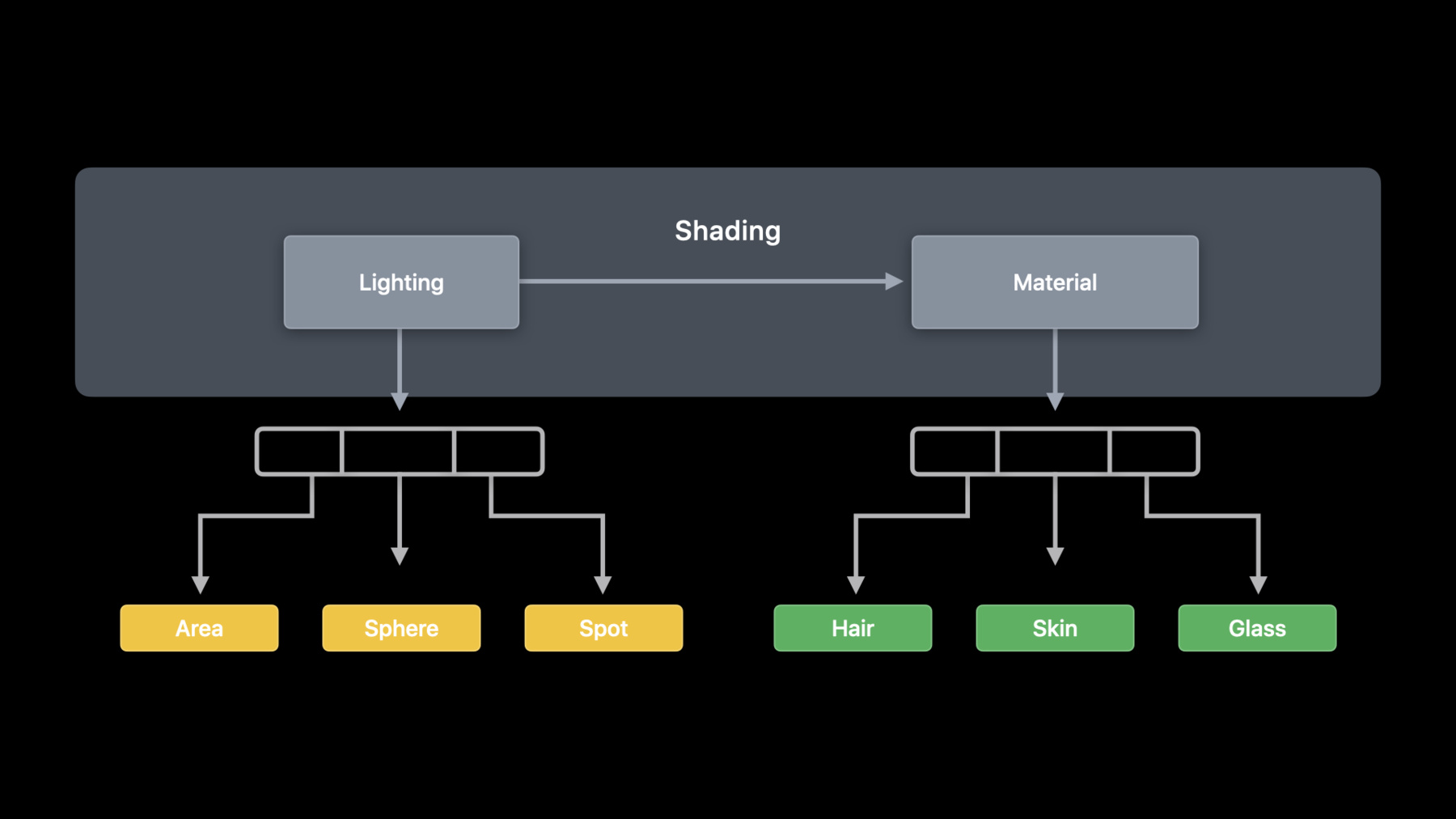
Function groups on GPU
// Add function groups to our shading function
float3 shade(...)
{
    LightingFunction *lightingFunction = lightingFunctions[light.index];
    [[function_groups("lighting")]] Lighting lighting = lightingFunction(light,
triangleIntersection);

    MaterialFunction *materialFunction = materialFunctions[material.index];
    [[function_groups("material")]] float3 result = materialFunction(material, lighting, triangleIntersection);
    return result;
}
Function groups on CPU
// Function Group configuration
let linkedFunctions = MTLLinkedFunctions()
linkedFunctions.functions = [area, spot, sphere, hair, glass, skin]
linkedFunctions.groups = ["lighting" : [area, spot, sphere ],
                          "material" : [hair, glass, skin ] ]
computeDescriptor.linkedFunctions = linkedFunctions
Resources
Related sessions
-
 40 min
 -
 25 min